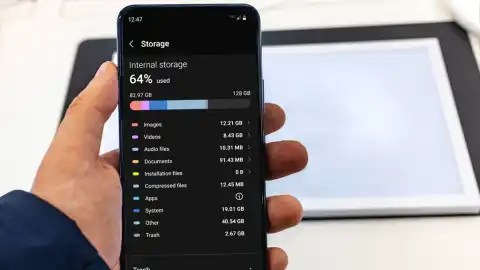
Everyone needs more storage space on his or her mobile phone but most of the people finds it difficult to free up storage space. most of the unused files ( pictures, audio , video, documents and more ) normally takes up more storage space on your phone of which you need to get away with. Follow this steps to do it yourself.
To free up storage space on your phone, you can:
- Delete Unused Apps: Remove apps you no longer use.
- Clear Cache: Go to settings and clear cache for apps to free up temporary data.
- Delete Old Files: Remove old photos, videos, and files you no longer need.
- Move Files to SD Card (if applicable): Transfer media files to an external SD card if your phone supports it.
- Use Cloud Storage: Upload photos and documents to cloud services like Google Drive or Dropbox.
- Uninstall Updates for Unused System Apps: Some system apps can be rolled back to their original versions to save space.
- Delete Downloads: Clear the Downloads folder of unnecessary files.
- Check and Manage Large Files: Identify and remove large files consuming significant space.
- Remove Unnecessary Widgets: Widgets can take up space and resources, so remove those you don’t need.Factory Reset (as a last resort):
- Backup important data and perform a factory reset if other methods aren’t sufficient.
- Remember to review and back up important data before deleting anything
TRENDING STORIES
- BAPSA Congratulates Hon. Baba Jamal on His Parliamentary Victory.

- BAPSA Extends Warm Congratulations to Hon. Baba Jamal on Election as NDC Parliamentary Candidate for Ayawaso East
- Elon Musk Makes $698 Million Per Day — Here’s What He Earns Every Hour You Sleep

- Daddy Lumba Abusuapanin Reveals How Much Money Was made From His Funeral.

- Ms. BEATRICE SEWOR IS GRNMA NATIONAL BEST NURSE 2025

- Young Lady in Nwoya Reportedly Runs Mad After Refusing to Marry The Man Who Sponsored Her University Education.

- Hon. John Dumelo honours Ghana’s farmers on Parliament floor ahead of National Farmers’ Day

- Black Sherif: Ghana’s Streaming King — Four Years and Counting

- DENKYIRAMAN UNITED FOOTBALL CLUB ANNOUNCES MASSIVE JUSTIFY-YOUR-INCLUSION EXERCISE — TEAM LEADER RICHARD TUTU BOAHEN CALLS ON ALL TALENTS.

- Download : Kofi Kinaata ft Sarkodie -“Have Mercy 2”

- The Boa-Amponsem Past Students Association Congratulates Dr.Dan Anane Frimpong On His Position As Deputy Secretary Of GMA.

- SEC Flags 33 TV Stations for Airing Suspected ‘Money-Doubling’ Scams

- High Court Orders Rerun Of Kpandai Seat Currently Occupied By NPP’s Matthew Nyindam

- EC Staff Petitions President Mahama To Remove Chairperson Jean Mensa, Deputies

- Ashanti Regional Minister Has Received Report On The NAIMOS Attack At Obuasi.

- Breaking The Boundaries: What Holds Denkyira Artists Back — And Why The Time For Change Is Now



 Richghanaonline.com
Leave a comment